
TL;DR
-
Marine and boat repair shops lose hours daily to paperwork, fragmented communication, and delayed approvals, quietly reducing productivity in marine repair services.
-
These small inefficiencies add up, leading to slow estimates, missed approvals, and scheduling chaos that affect business performance and can cost thousands each month.
-
Standalone marine repair software improves efficiency for 72% of service firms, letting shops reduce errors, complete more jobs, and keep boat owners satisfied.
-
DockMaster offers an all-in-one platform that streamlines work orders, approvals, scheduling, communication, and payments, helping teams stay organized, reclaim hours, and work efficiently.
Marine repair businesses lose hours every day without realizing it. For example:
-
Technicians spend time on paperwork, waiting for approvals, and correcting data
-
Office staff spend time checking job status
-
Staff make repeated phone calls making online appointments to update boat owners
These small inefficiencies compound throughout the day and quietly reduce overall productivity. Tracking these lost hours reveals where the marine repair shop falls behind and allows managers to take action.
Marine repair software automatically records work, keeps job status visible, and centralizes communication so teams can focus on productive tasks. In fact, digital tools increased operational efficiency for 72% of service firms that adopted automation, which allowed staff to complete more work, reduce administrative time, and run smoother operations.
In this article, we’ll discuss how modern marine repair shop management software, such as DockMaster, helps shops recover lost hours, keep boat owners informed, and operate at full capacity.
The 7 Daily “Time Leaks” in Marine Repair Shops
Every marine repair shop owner knows the list of subtle time drains. They might seem small when you see them one at a time. However, they feel enormous when you add them on at the end of every day.
Let’s take a look at some of these challenges:
1. Quote creation and rework
Marine shop teams create estimates repeatedly for different customers, often starting from scratch because they lack reusable templates. In fact, manual paperwork and data entry take up 2-3 hours of the day, and errors creep in when teams miss labor rates, forget parts, or overlook fees.
Each mistake forces a revision, which doubles the time spent on the estimate and increases the chance of customer frustration when final invoices do not match expectations. Standardised templates in affordable marine repair software reduce repetitive typing, keep pricing consistent, and allow mechanics to move into approved work sooner.
2. Waiting on approvals
Technicians often complete a repair step and then pause while they wait for customer approval, often buried in texts, voicemails, or emails. These fragmented communication channels force teams into unnecessary pauses, and service organisations report average delays of 45 minutes per job as a result.
Those delays accumulate throughout the day, costing hours while technicians chase simple yes-or-no responses that arrive too late. A centralized approval system captures signatures, records timestamps, and displays approval status clearly so work can continue without constant follow-up.
3. Scheduling churn
Most shops lose hours every week because they lack a live view of work orders. Dispatchers constantly reshuffle jobs, reassign technicians, and tell staff that repairs they were scheduled to complete are no longer ready.
To be more specific, field service inefficiencies cost businesses billions annually, and 68% of service organizations report that unplanned downtime hits their revenue. Manual scheduling alone wastes an average of 15 hours per week per dispatcher, translating into more than $30,000 in lost productivity each year. Poor route planning compounds the problem, adding roughly 25% to vehicle operating costs through wasted fuel.
A calendar view in mobile boat repair software or desktop shop management systems addresses these issues by showing every job at a glance and highlighting conflicts before they disrupt the day.
4. Time tracking gaps
Many technicians clock in at the start of their shift and clock out at the end without linking hours to specific jobs. This hides idle time and makes it hard to see how long each task really takes.
Shops can underbill when labor hours aren’t tied to work orders, and managers lose track of productivity. Job-based time tracking fixes this by recording hours for each job and providing accurate data for better estimates and planning.
5. Job progress visibility
Offices, dock technicians, and managers often lack a single view of job status, leading to a constant flow of questions via phone, sticky notes, and email. This lack of visibility wastes time and leads to duplicated work, missed steps, and poor prioritization.
Research shows that poor inventory visibility and job tracking add an average of 25% to operational costs. Digital job progress tracking lets everyone see the same status at the same time, reducing back-and-forth and helping teams focus on what needs to be done next.
6. Communication overhead
Technicians, managers, and office staff spend hours every day on texts, calls, and emails without a central system. This constant back-and-forth wastes time, creates confusion, and leads to duplicate follow-ups.
In a typical field service operation, status inquiry calls can consume 15–20 hours of support capacity per week when handled manually. Frequent inbound calls from customers asking basic questions, such as “When will the technician arrive?”, indicate a lack of real-time visibility.
Mobile field service and boat repair apps cut unnecessary calls by up to 67% and, with centralized updates, reduce inbound customer calls by 60–70%, keeping everyone on the same page. Real-time access to messages and job updates lets teams streamline communication and reclaim hours each week to focus on work that drives results.
7. Slow invoicing and slow payment
After completing a job, shops should issue invoices and collect payments promptly, but many delay this step for days or weeks. Research shows that manual invoice processing takes over 10.3 days, while automated bookkeeping reduces the time to about 3.2 days.
Marine repair shops using repair software that generates digital invoices close out jobs faster, maintain steady cash flow, and reduce disputes by sending boat owners clear, accurate invoices immediately after service.
📌Also read*: Boat Maintenance Software: How To Streamline Marina Operations From Service To Billing*
How Marine Repair Software Fixes Daily Time Leaks
Most shops operate in chaos, dealing with handwritten notes, spreadsheets, fragmented communication, and outdated auto repair software. DockMaster streamlines the entire workflow, from estimate and scheduling to payments and invoice processing, reducing errors, eliminating duplicate work, and reclaiming hours every week.
Here’s how:
1. Pre-built work orders and service templates
With DockMaster, creating and managing work orders is fast, simple, and error-free. Each work order captures all essential customer and vessel information, requested services, repair orders, and required parts or labor, helping marine repair services online stay organized. You can use pre-built service templates for recurring jobs, such as tune-ups, winterization, or oil changes, to save time and maintain consistency. The system automatically tracks special-order parts, so everyone knows exactly when they will arrive.
The Service Management module tracks labor, parts, sublets, and other service charges from start to finish. It integrates with the DockMaster’s Financial Management module to provide complete accounting and transaction handling, professional financial documents, reporting, bank reconciliation, and integrated payment solutions. The service monitor provides office staff, dock technicians, and managers with real-time visibility into which jobs are active, waiting for parts, or ready for billing. This transparency eliminates miscommunications and lost paperwork.
Here’s how to create a work order:
- Navigate to the work order section: Service Management → Maintenance Functions → Work Orders
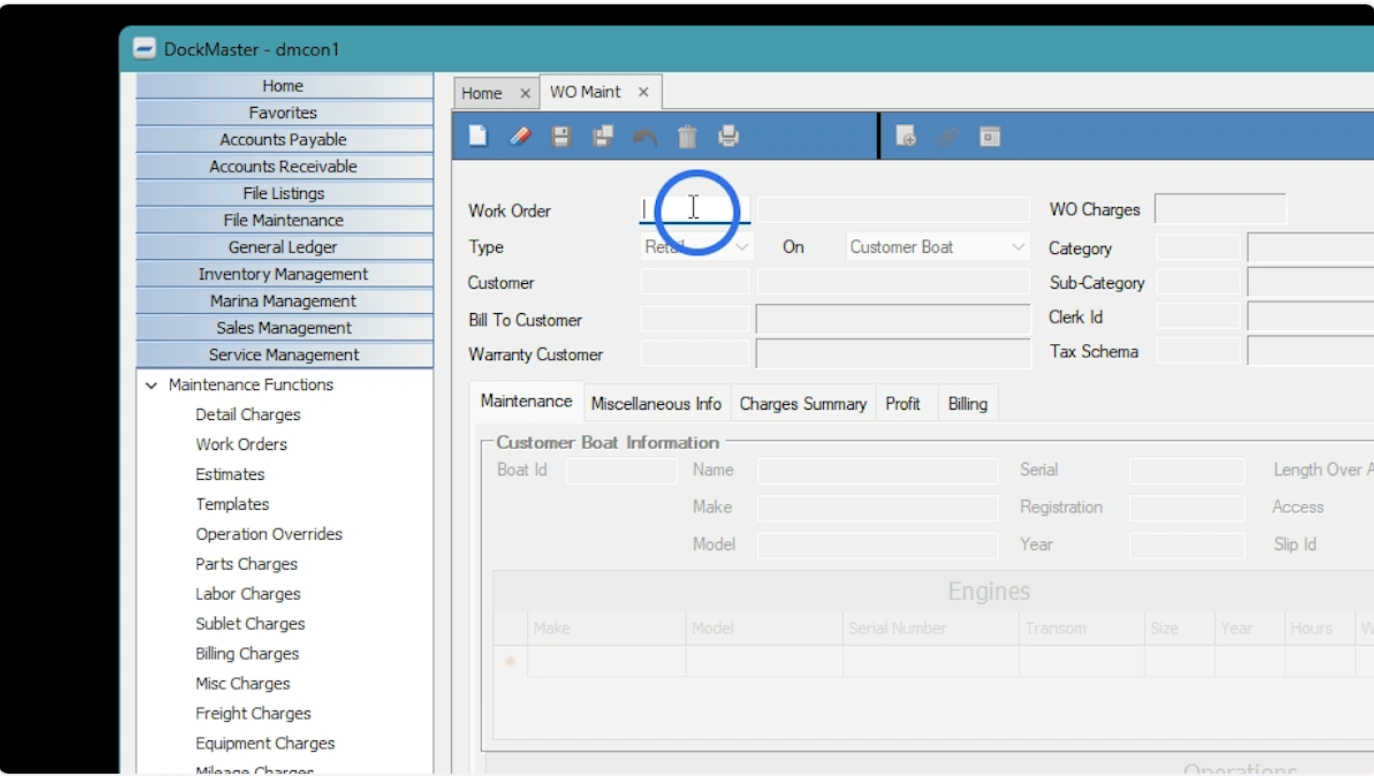
Create a new work order by typing "N" and pressing enter
- Create a new work order by pressing N and hitting Enter, or click the blank paper icon, or right-click in the ID field and select “Create WO from F9” to generate a work order from an existing estimate, template, or another work order.
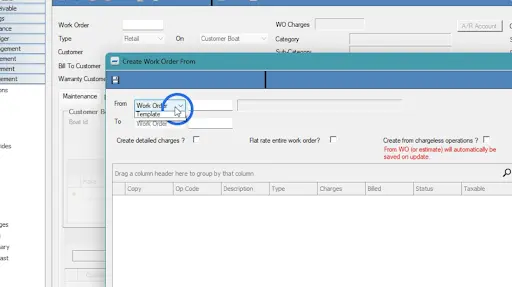
Choose to create the WO from an Estimate or a Template
- Choose the work order type from the options: Retail, Internal, Warranty, Prep/Rigging, or Assembly, depending on billing and operational needs.
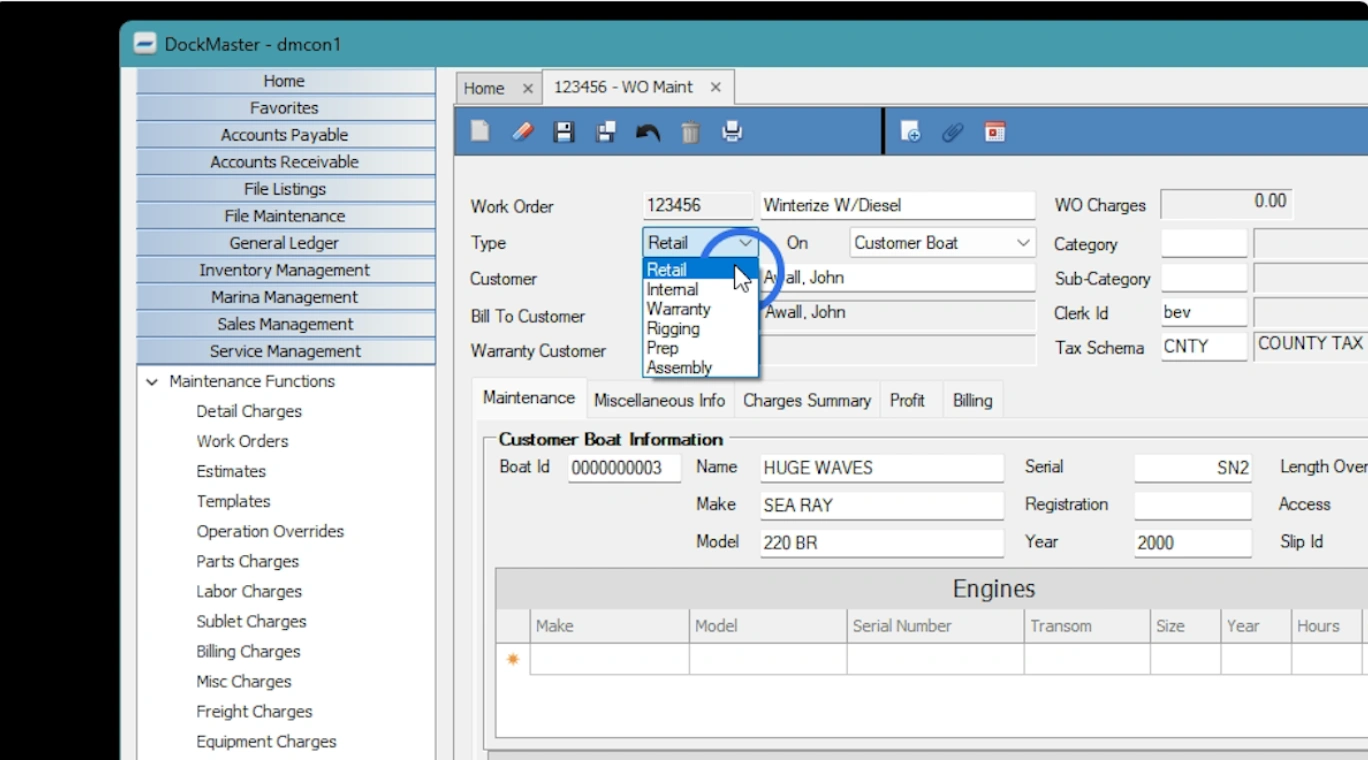
Select the type of work order
-
Fill out required fields:
-
Customer and billing information
-
Warranty customer (if applicable)
-
Clerk ID, category, creation, and due dates
-
Estimated start and completion dates
-
Vessel information (select from customer profile or enter manually for one-off cases)
-
Use the operation grid to insert services, update labor/parts, add opcodes, or reprice as needed.
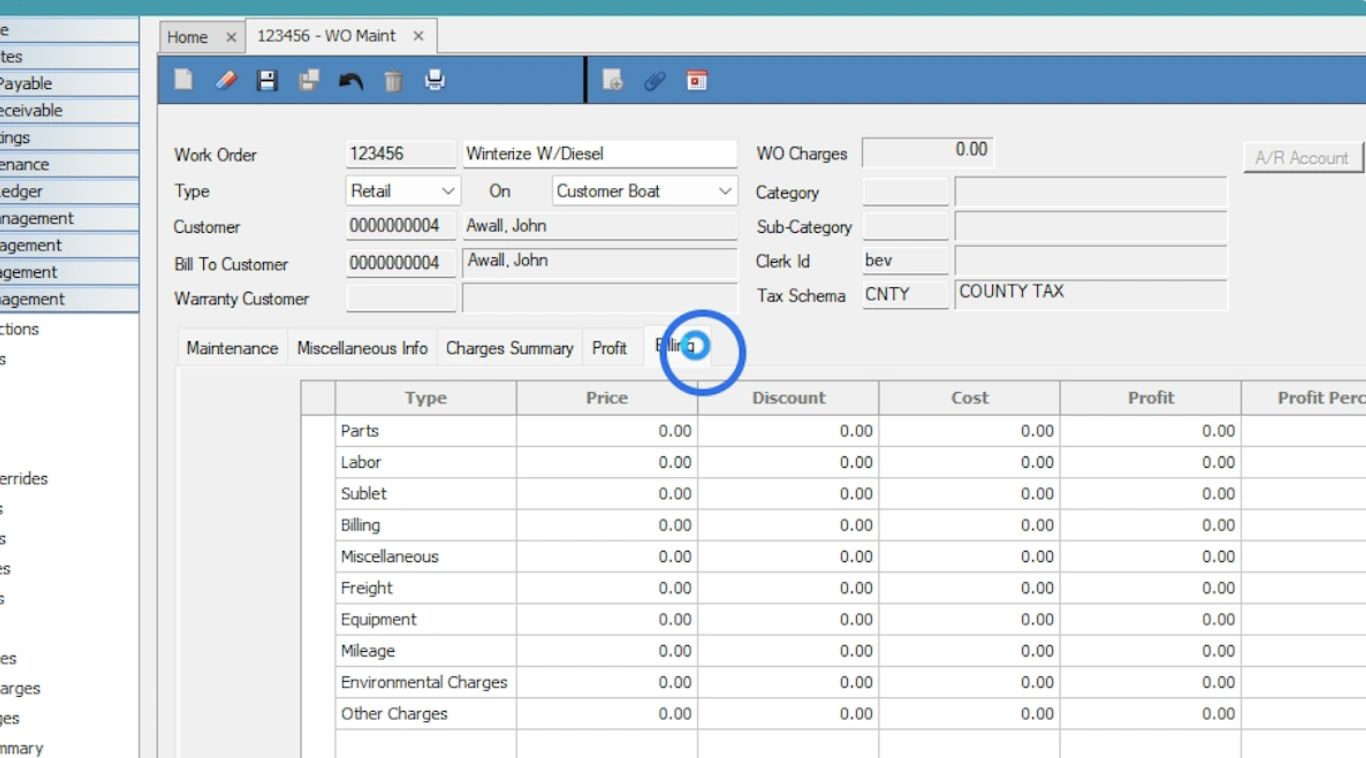
Review all necessary tabs
-
Review all necessary tabs for context:
-
Miscellaneous info: Add comments or use custom fields
-
Charges summary & profit: View breakdowns and margin insights
-
Billing: Handle partial or full billing, apply discounts, and close the job
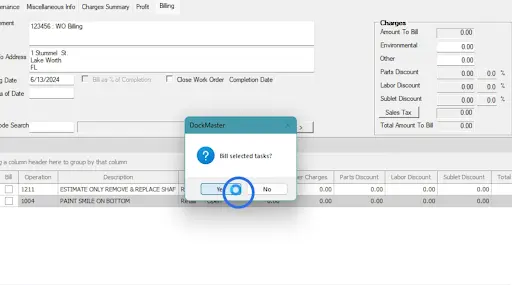
Click Yes to complete the process
- Click Yes to save the work order and finalize billing or invoicing.
Here’s why DockMaster transforms your work orders
-
Technicians see clear job priorities, eliminating guesswork
-
Time and parts are logged immediately, reducing lost billable hours
-
Photos, notes, and service history are captured directly in each work order
-
Paperwork disappears, freeing staff to focus on service
-
Real-time status updates improve communication between the dock and the office
-
Teams can track special-order parts and avoid delays
With all updates flowing instantly into a single system, managers gain full visibility, technicians work efficiently, and customers receive accurate timelines and invoices. Everything moves smoothly from estimate to completion, protecting revenue and improving service quality.
2. Customer approvals and quote tracking
Managing customer approvals and quotes can slow down your shop if done manually. DockMaster streamlines this entire process by bringing estimates, approvals, work orders, scheduling, and payment tracking into one comprehensive Service Management system.
With DockMaster, your team can create and send accurate, professional estimates in minutes from desktop or mobile devices. Service writers use customizable, pre-built job templates and rate cards to quickly generate precise quotes with detailed breakdowns of parts, labor, and hours.
Customers receive estimates via email or SMS and can approve work digitally, keeping projects moving without paperwork delays. Real-time job tracking keeps both your team and your customers informed throughout the service process, increasing transparency and trust.
Additionally, DockMaster tracks the status of every estimate and work order, so your team always knows which jobs are pending approval, approved, or in progress. Once approved, estimates convert seamlessly into work orders and invoices. Customers can make full or partial payments by credit card, ACH, or manual methods, helping you get paid faster.
With integrated financial synchronization to QuickBooks, DockMaster automatically keeps your accounting up to date by syncing customers, estimates, invoices, and payments. Built-in messaging tools allow your team to send updates on job progress, approval requests, and payment reminders via email or SMS.
3. Time tracking and scheduling
Once customers approve quotes, your team moves quickly into service execution. DockMaster enables technicians to log hours and material usage from any device, capturing labor and parts in real time. With real-time tracking, managers monitor every active work order while teams stay aligned on job progress. Managers assign jobs using the drag-and-drop calendar, track live job statuses, and balance workloads to prevent delays.
Field teams upload photos, videos, and notes directly from the job site, giving the office and customers a clear view of progress. Through live status updates, customers review updates, approve work digitally, and stay informed throughout the service process. Meanwhile, teams send estimates with custom notes, post updates as work continues, and keep projects moving without paperwork delays. This streamlined communication eliminates challenges and keeps jobs on schedule.
Atlantic Boats experienced these benefits firsthand. After switching from paper-based logs to DockMaster, their team tracked hours, managed multiple jobs simultaneously, and monitored progress in real time. As a result, they achieved reduced downtime, faster job completion, and a smoother workflow across the dock and office.
As Jason Lindstrom, Marine Store Manager at Atlantic Boats, shared:
“For businesses still running their operations on pen and paper, they don’t know what they’re missing out on. DockMaster brings so much more ease and efficiency to marina businesses. I still keep paper and notes out of habit, but at the same time, I really don’t have to, because 99% of the transactions and correspondence is stored in the software.”
4. Centralized communication
Technicians spend most of their time on the dock or in the yard, away from the office. DockMaster keeps your team connected and productive from anywhere by centralizing communication across mobile, web, and desktop.
With DockMaster Mobile, technicians can:
-
View open work orders and associated tasks (opcodes)
-
Track time using start/stop timers or manual entry
-
Update job statuses in real time
-
Log labor, parts, and service notes
-
Capture and upload photos, videos, and documents from the job site
-
Record voice-to-text notes hands-free
-
Access schedules with color-coded status indicators
All attachments, time entries, and status updates sync automatically with DockMaster Desktop, keeping office staff always updated with the latest job information.
Through DockMaster Web, managers and office teams gain real-time visibility into customer records, vessel information, service history, and work order progress. Customers can access the self-service portal to view invoices, submit service requests, and approve documents digitally, keeping communication clear and centralized.
As a result, teams stay aligned, customers stay informed, and service operations move forward without delays.
5. Payment collection & accounting integration
Once work is complete, DockMaster helps you collect payments quickly and securely while keeping your accounting fully synced. DockMaster Payments, powered by ValPay, handles all transactions, including point-of-sale, parts sales, and work orders, giving your team a unified view of every financial interaction.
Your team sends invoices, estimates, or reservation contracts directly to customers, who can pay instantly by credit card or ACH. DockMaster records every transaction in real time, eliminating manual entry and reducing administrative overhead. Next-day funding puts payments in your bank account quickly, improving cash flow and giving your business faster access to operational funds.
DockMaster also provides a centralized portal to monitor payment activity, track trends, and reconcile accounts efficiently. With secure, end-to-end payment processing, your team minimizes errors, prevents fraud, and ensures every transaction flows seamlessly into your accounting system.
How Much Are Lost Minutes Costing You?
Daily inefficiencies cost real money. DockMaster streamlines approvals, scheduling, communication, and payments, but you can also measure the impact of lost time on your bottom line.
Use this simple formula to calculate lost revenue:
Tech count × Minutes lost per tech per day × Days per month × Billable rate
For example, a shop with 5 technicians loses 20 minutes per technician per day to approvals, rescheduling, and chasing information. They work 22 days per month at a billable rate of $80 per hour.
This equates to:
5 × 20 × 22 × ($80 ÷ 60) ≈ $14,667 in monthly lost hours.
Reclaim Your Time and Maximize Profit with DockMaster
As we saw earlier, marine repair shops lose hours every day, which affects revenue, efficiency, and customer satisfaction. DockMaster centralizes work orders, approvals, scheduling, communication, and payments in a single connected system.
The marine management and boat repair software automates repetitive tasks, provides technicians with real-time visibility, and syncs every transaction with your accounting system, helping your team complete more jobs accurately and on time. When you measure the true cost of lost time, the impact becomes clear and actionable. By streamlining workflows, your shop can reclaim hours, reduce errors, and turn wasted time into revenue.
Don’t let inefficiencies slow your shop down. Book a DockMaster demo today to see how your team can work smarter, finish faster, and boost your bottom line.
FAQs
How do marine repair shops track billable hours accurately?
Technicians log hours directly to each repair order using incredible marine repair software. Managers review entries in real time, link labor to specific jobs, and ensure accurate billing, eliminating unrecorded or misallocated hours and improving revenue capture.
What is the best way to manage marine work orders?
Marine boat repair shops can create and manage work orders using an auto repair software program with all customer, vessel, and service details. Assign tasks to technicians, track labor and parts usage, monitor job progress, and integrate with inventory and accounting to prevent errors and keep repairs on schedule.
How do you speed up marine repair estimates and approvals?
You can speed up marine repair estimates and approvals by using reusable templates in mobile software that automatically calculates labor and parts. Then, send digital estimates for electronic approval, allowing technicians to start jobs immediately. Customers can also find your services through a boat repair shop listing.