
TL;DR
-
Marine service teams handle complex workflows, managing estimates, parts, work orders, and billing, while relying on paper or generic tools slows jobs and creates errors.
-
Digital solutions are changing the game, with 48% of field service teams seeing positive ROI within a year, resulting in faster work, fewer mistakes, and greater efficiency.
-
Marine mechanic software like DockMaster integrates estimates, work orders, parts, and billing in a single system, giving technicians mobile access, clear job priorities, and real-time updates.
-
With accurate inventory, automated invoicing, and instant communication, teams finish jobs faster, managers stay in control, and customers get timely, professional service.

For marine repair businesses, a day can start with an estimate and end with an invoice, while teams track service history, coordinate parts, update work orders, and keep customers satisfied. Relying on spreadsheets, paper logs, or generic tools slows work, creates delays, and leads to errors that eat into revenue and margins.
In 2025, digital solutions transformed field service work on land. Fleet and field service management tools improved scheduling, reduced errors, and allowed teams to serve more customers. In fact, nearly half (48%) of field service and workforce management teams reported a positive ROI within a year, up from 41% in 2024, indicating that digital tools are helping teams work faster, reduce errors, and boost efficiency.
The marina industry is no different. Marine service leaders now use purpose-built software to manage the full workflow, centralizing customer and vessel information, tracking parts and labor, and completing jobs faster with fewer mistakes.
This article explains why traditional tools fail service teams, outlines a modern service workflow, and shows how marine mechanic software increases productivity and profits.
Pain Points in Marine Service Work
Traditional workflows introduce recurring issues that reduce productivity and frustrate teams and customers alike. Let’s take a look at some of these challenges:
1. Estimates disconnected from actual labor
Estimators may produce quotes without knowing how long a task really takes. When technicians work more hours than estimated, the office must chase approvals and manual adjustments.
That leads to:
-
Disputed billing
-
Missed revenue
-
Confused customers
Studies show AI in field service can increase first-time fix rates by roughly 18% and help ensure labor and parts are accurately accounted for, protecting revenue.
2. Missed billable hours
When technicians track hours manually or lose paperwork, marine repair shops never charge for every billable minute.
Even small unrecorded jobs add up to significant lost revenue over a week or a month.
3. Poor technician communication
Without real‑time updates, technicians and office staff work with outdated information. A technician might work on a job already marked complete or pick up a part that the system shows in stock when it is not.
Data from fleet managers showed that improved communication and real‑time data improved operational efficiency by more than 50% for teams using mobile tools.
4. Parts delays halting jobs
If parts are not tracked accurately, technicians waste hours waiting for inventory that the office thinks is available. This drags out service jobs, confuses customers, and harms margins.
Predictive AI in field service and marina operations can reduce emergency calls by 23%, helping teams anticipate parts needs before delays occur and maintain smooth operations.
5. Manual invoicing errors
Paper invoices or manual billing are prone to typos, mismatches, and missing details. When invoices are wrong or late, customers hesitate to pay. That increases administrative workload and frustrates clients.
Modern digital tools replace paper processes, improving billing accuracy and speeding up payment collection. In fact, modern maritime compliance and maintenance software, used by over 9,000 users across 1,300 vessels, eliminated fragmented paper logs and provided mobile access to vessel status and crew records in 2025.
End-to-End Service Workflow Breakdown
To stay competitive and productive, marine service teams need a marine service management software that covers the full lifecycle of a service job.
Here’s how modern marina mechanic software, such as DockMaster, powered by DockMaster, streamlines each step.
A. Estimating & job authorization
Estimating marine service jobs requires visibility into parts, labor, and vessel conditions. Manual processes separate estimating from execution, often causing delays and errors. Digital tools like DockMaster connect both, streamlining the process from quote to job approval.
Here’s how:
-
Technicians can add notes, photos, and parts requirements directly from the field
-
Office staff access real-time pricing, parts availability, and technician hours to create accurate estimates
-
Customers receive clear, professional estimates instantly and can approve them via phone or computer
This approach eliminates the back-and-forth of emails and sticky notes, speeding approvals so teams can move from estimate to action without delays. It also reduces quoting errors and protects revenue by keeping labor and parts accurately accounted for.
B. Work order execution
Once an estimate is approved, the next step is turning it into an actionable marine work order. Modern tools like DockMaster make this process fast, accurate, and trackable, so your team can move from the office to the dock without delays.
As a result, marine technicians receive work orders on their mobile devices with:
-
Clear instructions
-
Priority levels
-
Linked customer and vessel information
With DockMaster, you can create work orders in a simple way. You can start directly from approved estimates, which saves time and eliminates manual data entry. Each work order contains detailed information about the customer, the vessel, the requested services, and the required parts or labor. When special-order parts are added, the system automatically tracks them, so everyone knows exactly when they’ll arrive.
The service monitor gives your entire team real-time visibility. Office staff, dock technicians, and managers can see which jobs are active, waiting for parts, or ready for billing. This transparency eliminates miscommunications and lost paperwork, keeping everyone on the same page.
Here’s how to create a work order in DockMaster:
- Navigate to Service Management → Maintenance Functions → Work Orders
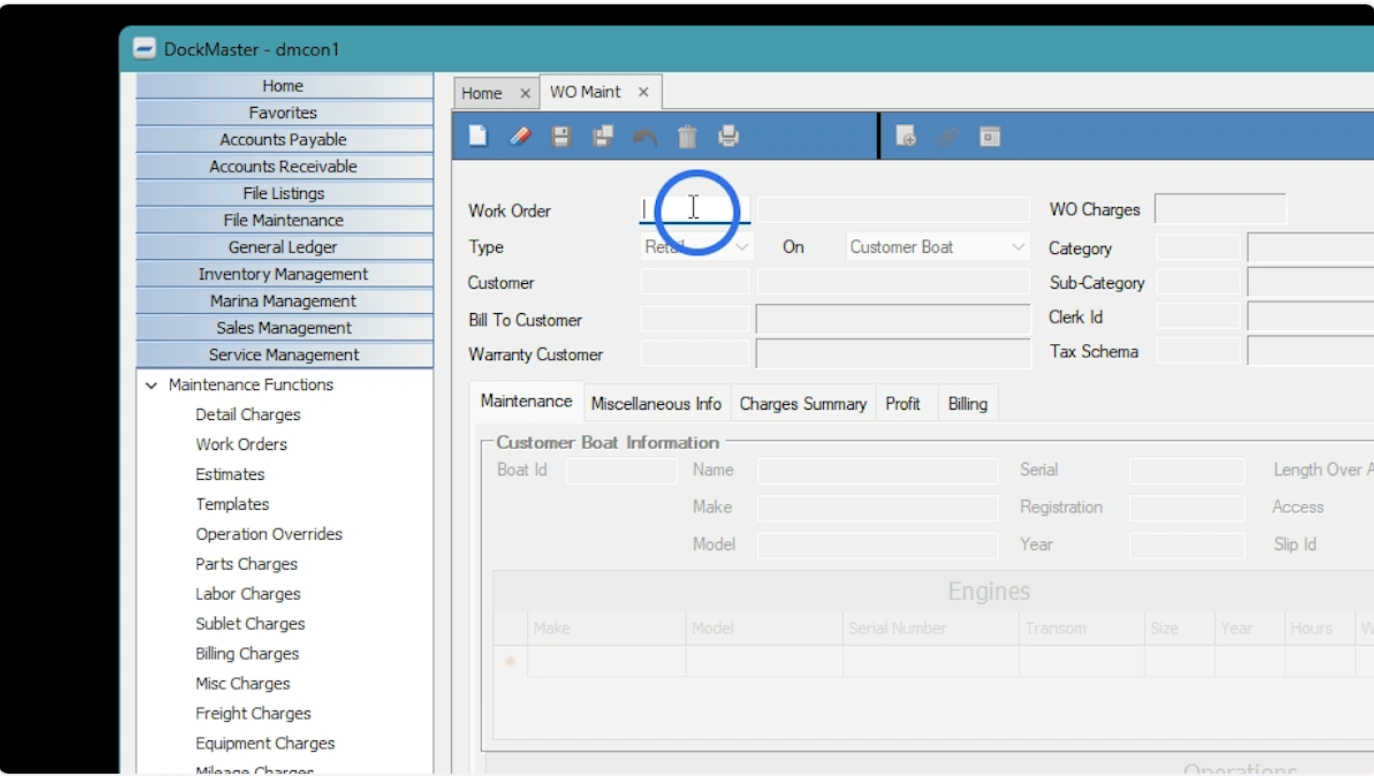
Create a new work order by typing "N" and pressing enter
- Create a new work order by typing N, clicking the blank paper icon, or entering a new number. You can also right-click in the ID field and select “Create WO from F9” to generate a work order from an existing estimate, template, or another work order
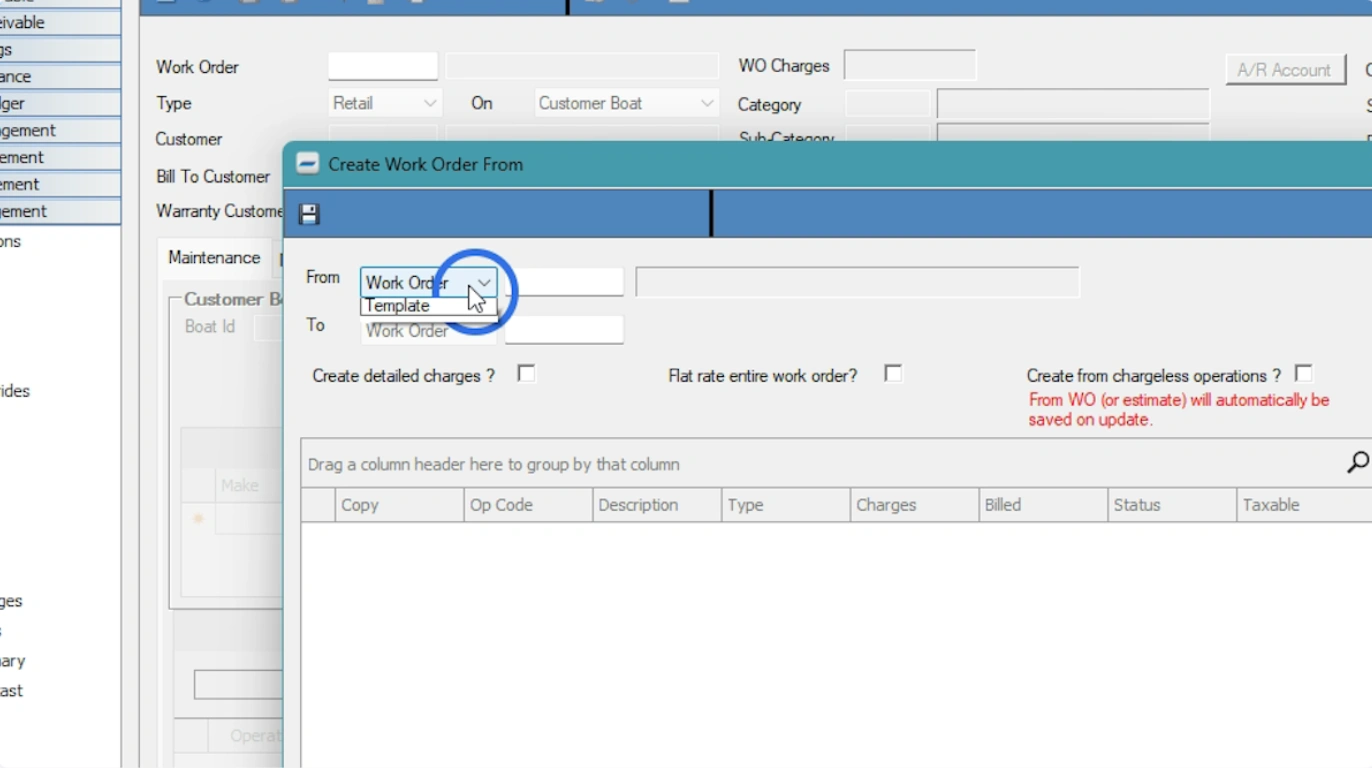
Choose to create the WO from an Estimate or a Template
- Choose the work order type, from Retail, Internal, Warranty, Prep/Rigging, or Assembly, depending on billing and operational needs
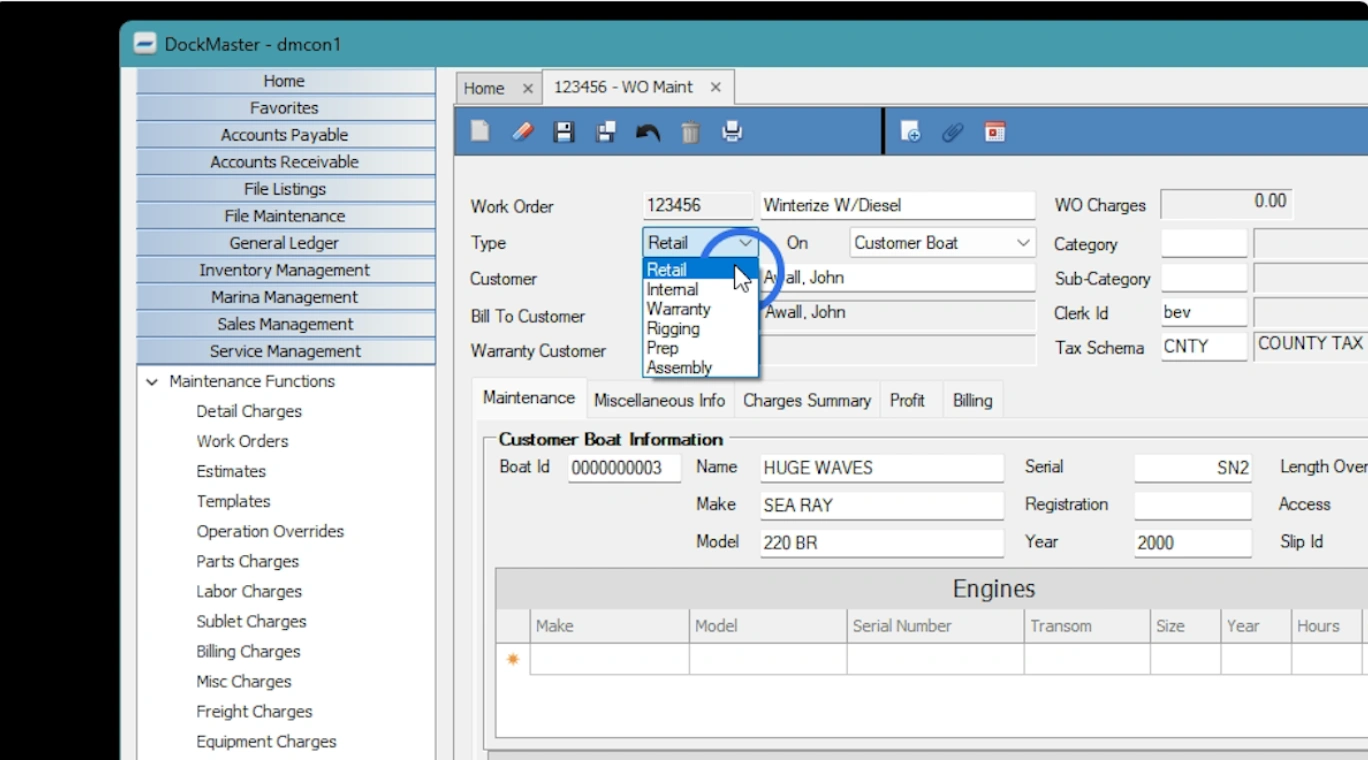
Select the type of work order
-
Fill out required fields:
-
Customer and billing information
-
Warranty customer (if applicable)
-
Clerk ID, category, creation and due dates
-
Estimated start and completion dates
-
Select the vessel from the customer’s profile or manually enter vessel information for one-off cases
-
Use the operation grid to add services, update labor/parts, insert opcodes, or reprice as needed
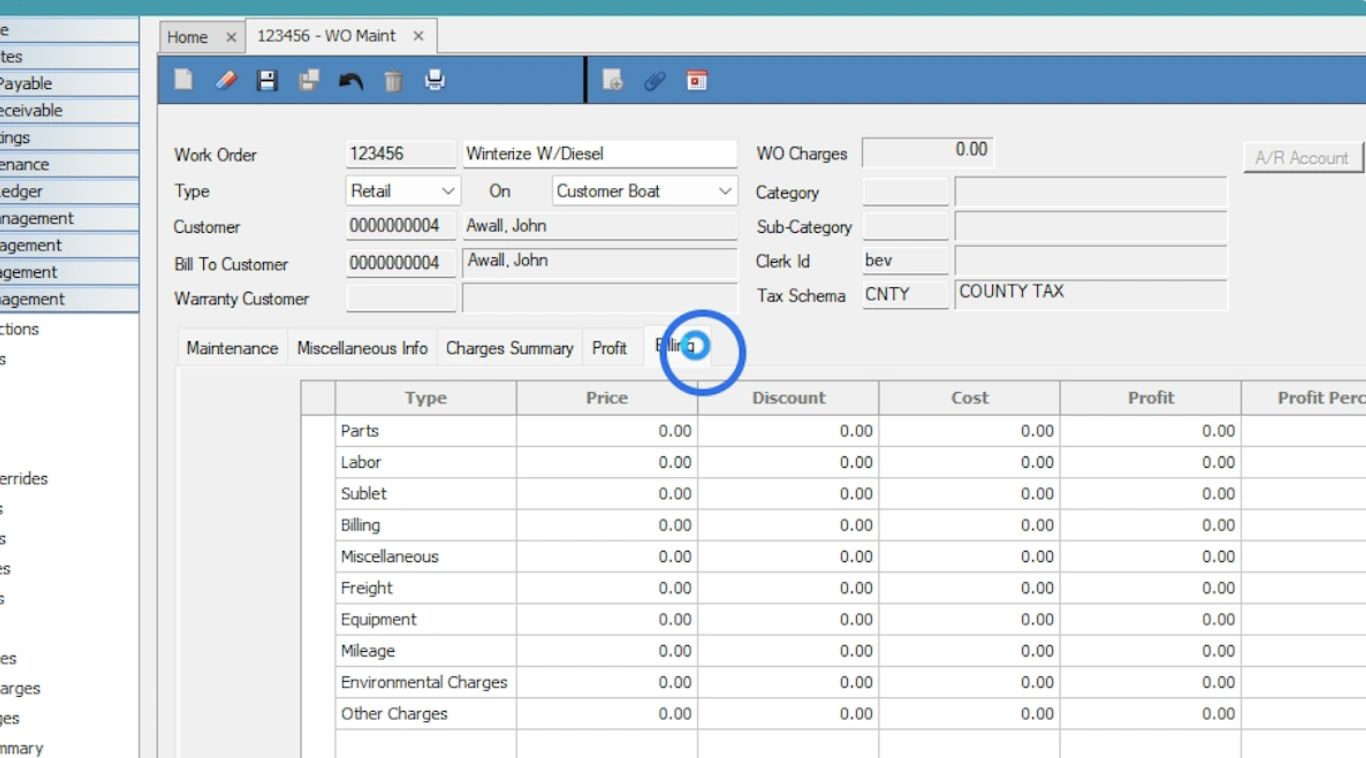
Review all necessary tabs
-
Review tabs for full context:
-
Miscellaneous info: Add comments or use custom fields
-
Charges summary & profit: View breakdowns and margin insights
-
Billing: Handle partial or full billing, apply discounts, and close the job
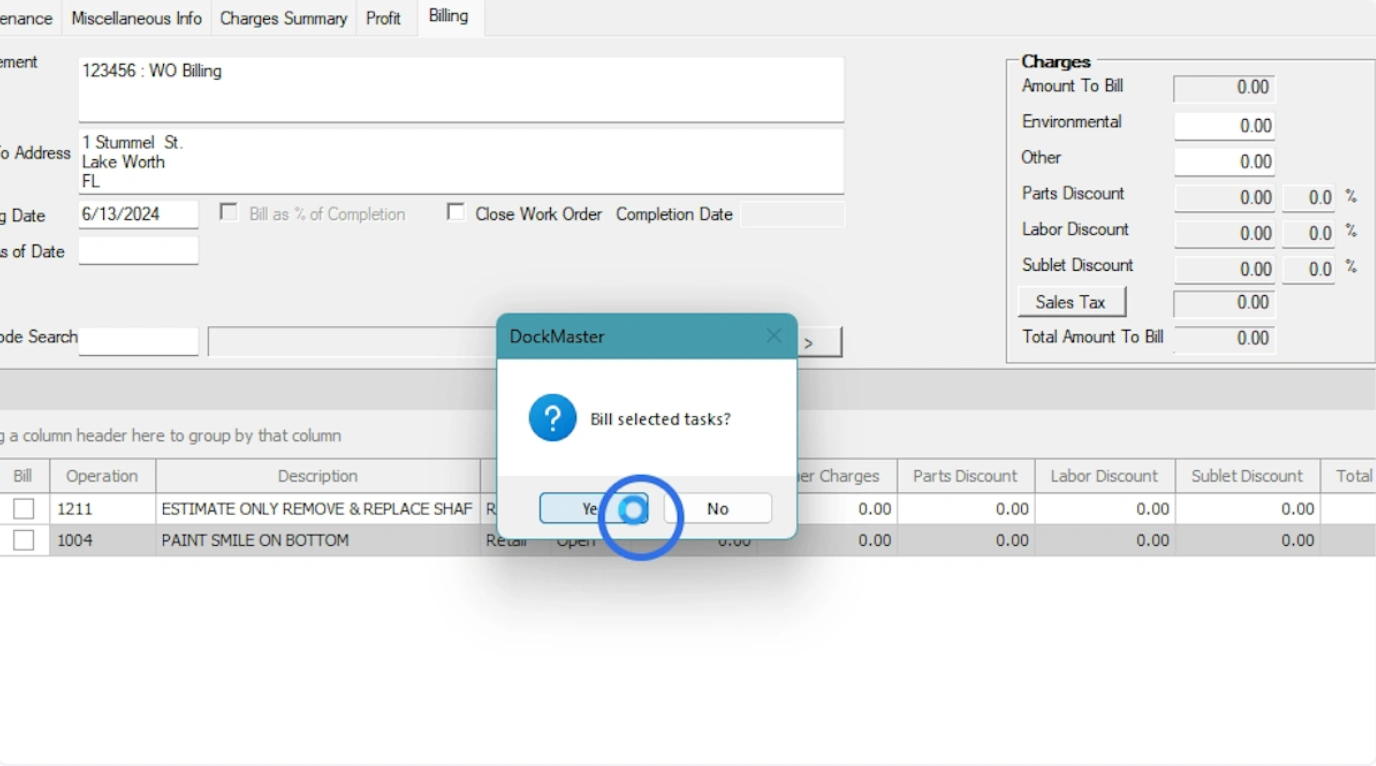
Click Yes to complete the process
- Save the work order and confirm to complete billing or invoicing.
The benefits of using DockMaster for work orders are easy to see:
-
Technicians see clear job priorities and eliminate guesswork
-
Time and parts are logged in the moment, reducing lost billable hours
-
Photos, notes, and service history are captured directly in each work order
-
Paperwork disappears, freeing technicians and office staff to focus on service
-
Real-time status updates improve communication between the dock and the office
-
Teams can track special-order parts and avoid delays
With all updates flowing instantly into a single system, managers gain full visibility, technicians work efficiently, and customers receive accurate timelines and invoices. Everything moves smoothly from estimate to completion, protecting revenue and improving service quality.
C. Parts & inventory coordination
Parts management is critical in marine service because every vessel and job can require unique components. If parts aren’t tracked properly, jobs can’t move forward.
Here’s how DockMaster helps teams with inventory management:
-
Track parts usage as technicians record them directly in the DockMaster Mobile App
-
See real-time inventory across the workshop and service yards
-
Automatically create purchase orders when stock falls below preset levels
-
Monitor parts movements and usage history to reduce waste
-
Link parts to specific work orders and service templates to prevent mistakes
With DockMaster, accurate inventory and real-time tracking prevent delays and costly emergency parts orders. Technicians spend less time searching for parts, office staff always know what is available, and managers can coordinate jobs efficiently. This keeps work flowing smoothly, saves money, and improves overall service speed and accuracy.
D. Billing & invoicing
After completing service, the next challenge is billing accurately and quickly. Manual processes require gathering paperwork, re-entering hours, parts, and job notes, and hoping nothing was missed. DockMaster connects work orders directly to billing, automatically updates inventory when parts are used, and ensures all job details flow seamlessly into invoices.
With DockMaster, teams can:
-
Generate invoices that include hours, parts, photos, and notes from the job
-
Email invoices directly to customers from the system
-
Offer multiple billing options, including flat rates, itemized parts and labor, or custom service packages
-
Track technician hours and materials in real time from any device
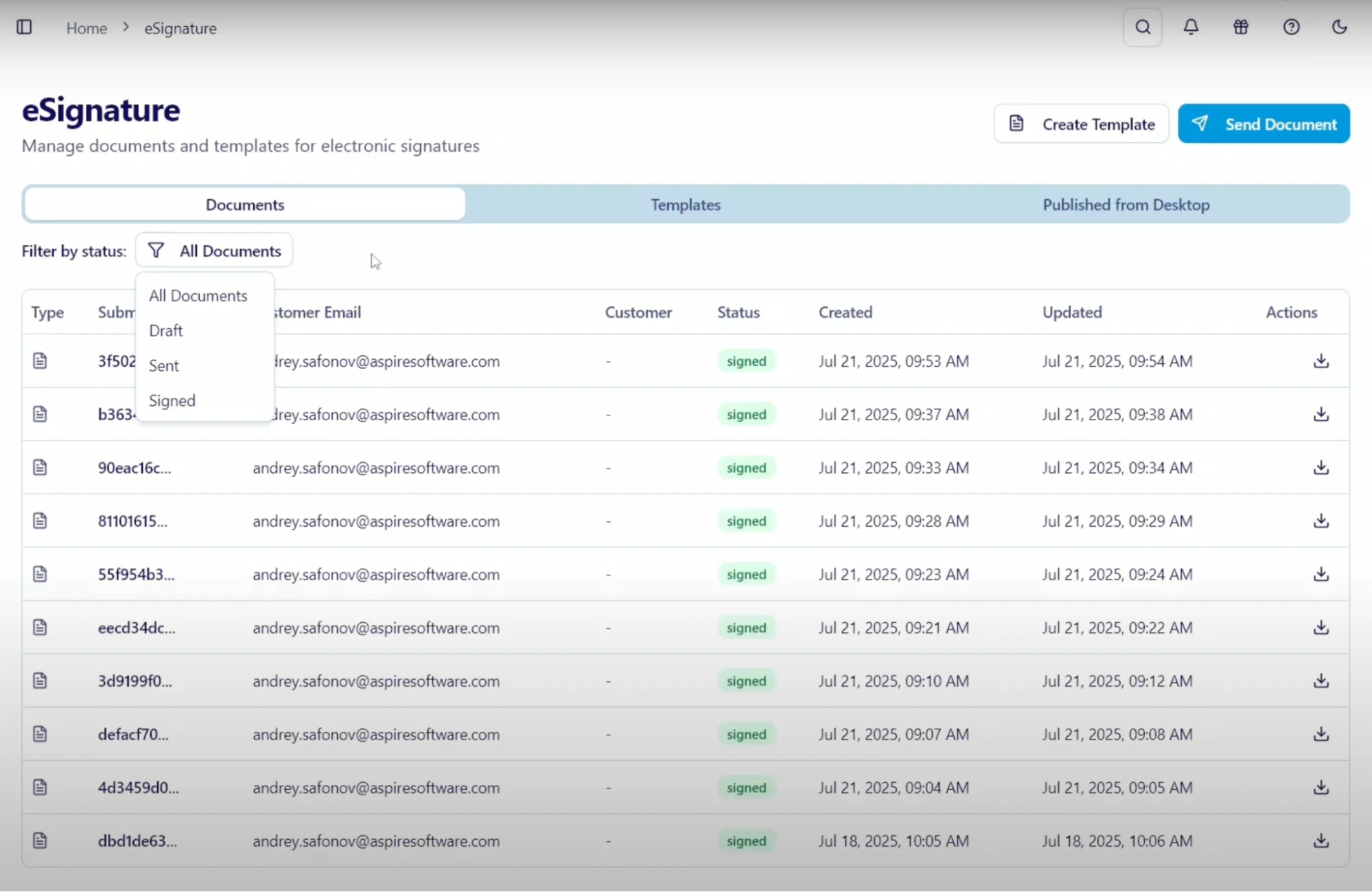
- Bundle documents like slip leases, waivers, and service authorizations for digital signature in a single step
-
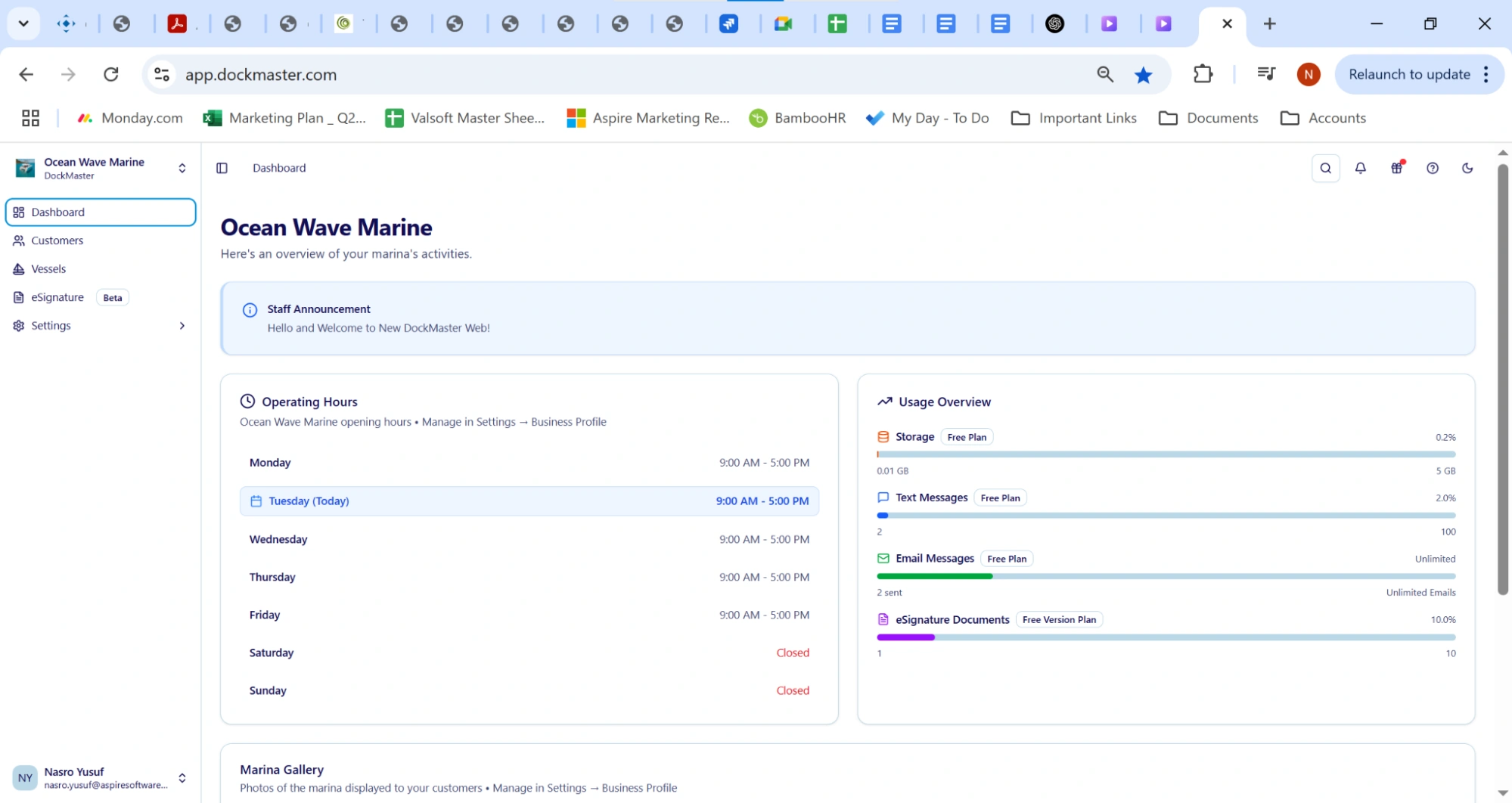
Integrate with accounting systems to sync data automatically
-
Allow customers to approve and pay invoices online
This digital workflow reduces errors, speeds approvals, and improves cash flow. Technicians log hours and parts directly into DockMaster, so invoices are accurate and ready immediately. Managers gain full visibility into job costs, and customers receive professional, transparent bills they can pay without having to jump between multiple systems.
Atlantic Boats illustrates these benefits clearly. Before switching to DockMaster, manual inventory and billing caused delays and stockouts. After implementation, the team automated reordering, kept inventory accurate, and enabled technicians to complete jobs faster without extra admin work.
As Marine Store Manager Jason Lindstrom said,
“For businesses still running their operations on pen and paper, they don’t know what they’re missing out on. DockMaster brings so much more ease and efficiency to marina businesses. I still keep paper and notes out of habit, but at the same time, I really don’t have to, because 99% of the transactions and correspondence is stored in the software.”
How Marine Technicians Maximize Productivity and Accuracy
Marine repair teams work on docks, in the field, and sometimes at sea. They need tools that support work wherever it happens. DockMaster gives technicians full mobile access, so they can manage their jobs without returning to the office or relying on paper notes.
As a result, mobile technicians can:
-
View job details anywhere on their mobile device
-
Check service history for each vessel
-
Log hours and parts directly in the system
-
Capture photos and notes from the field
-
Update job status immediately
-
Access pre-built work order templates to speed repetitive tasks
Mobile access puts technicians in control and keeps jobs moving. When devices show clear priorities instantly, teams tackle the most important tasks first. Mobile technicians capture notes, signatures, and photos directly in the system, which keeps information accurate and eliminates wasted time. With real-time updates, technicians finish jobs faster, managers adjust schedules easily, and customers get timely, accurate updates.
Why Marine‑Specific Mechanic Software Outperforms Generic Tools
You might ask why you need a marine‑specific tool instead of automotive or general service platforms. The answer lies in specialization.
Marine service work has unique demands. Boats operate on water, which creates structural and safety challenges that land vehicles don’t face. Parts inventories include specialized marine components that require careful tracking. Similarly, weather and docking schedules heavily influence when work can occur. Vessel safety and regulatory requirements also vary widely, adding complexity to every job.
A marina management software tool, on the other hand, like DockMaster:
-
Understands vessel categories and safety details
-
Includes marine parts lists
-
Uploads and organizes customer and vessel information in a way that fits the workflow
-
Supports marine‑centric scheduling, docking considerations, and regulatory logs
When a system fits the unique context of your work, teams save time on repetitive tasks and focus on delivering quality service.
Take Control of Service Workflows
Service managers can’t rely on disconnected tools to run a modern marine business. The complexity of marine service jobs demands an integrated system. Marine repair software like DockMaster brings scheduling, parts, communication, billing, and reporting together in one place.
That means:
-
Marina teams stay organized
-
Technicians work faster
-
Customers receive better service
-
Marine workshop gains full visibility into business performance
DockMaster helps everyone, from office staff to dockside technicians, work with confidence and clarity. Book a demo today and see DockMaster in action!